
Where can I access policy documents?
Policy documents are available in the secure Beacon Mutual online portal.
- Visit beaconmutual.com.
- Log into the Beacon online portal.
- Click on "Claims" to open the Claims Dashboard in the main menu.
(This option will only be accessible to users with the Claims Contact role. If you do not see this option, contact your Key Contact or the Beacon Support Center for assistance.)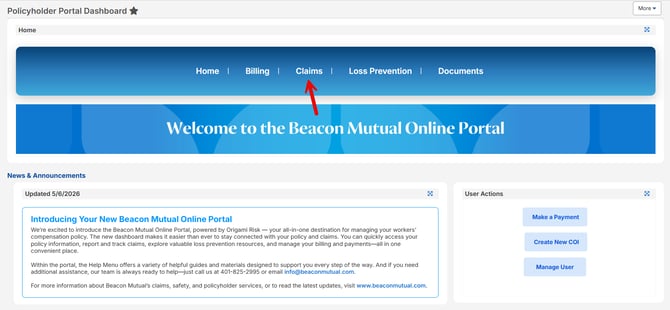
- Click the link to generate a Loss Run with Recoveries or Loss Run Without Recoveries.
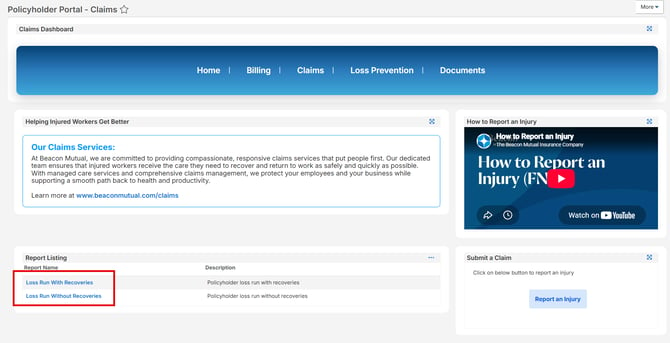
- Select the Effective Dates from the Options
- Click Refresh Report
- When the Report Generates, you can Download as an PDF, Word Doc, or Excel.

Tip for Users with More than One Insured: If you have access to more than one Insured through the Online Portal, you can change the Insured Option to "is equal to" and then click the Lookup icon to browse your Insured accounts. Click the checkmark to select the Insured and click "Done Selecting".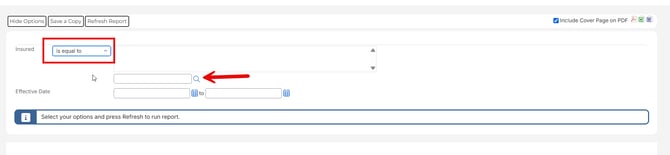

Frequently Asked Questions
Can I access loss runs in the portal?
Yes. Policyholders can access policy documents and loss runs through the secure portal on the Claims Dashboard. Agents can obtain loss runs from the Reports area in the agent portal.
Why can I not see Claims in my menu?
Access may depend on your user account role. Only users with the Claims Contact role will have access to the Claims Dashboard. Contact your Key Contact or the Beacon Support Center for assistance.
Who can help with portal access?
Contact the Beacon Support Center at 401-825-2995 for assistance with your portal account.