
If you encounter validation errors when submitting a New Business proposal, don't worry. These errors indicate that required information is missing or needs to be corrected before the proposal can move forward.
Agents can quickly review and resolve each validation error directly from the proposal record.
What You'll See
When validation errors are present, a red alert banner appears at the top of the proposal page.
The banner displays the message:
"This proposal has validation errors. Click here to view errors."
How to Fix Validation Errors
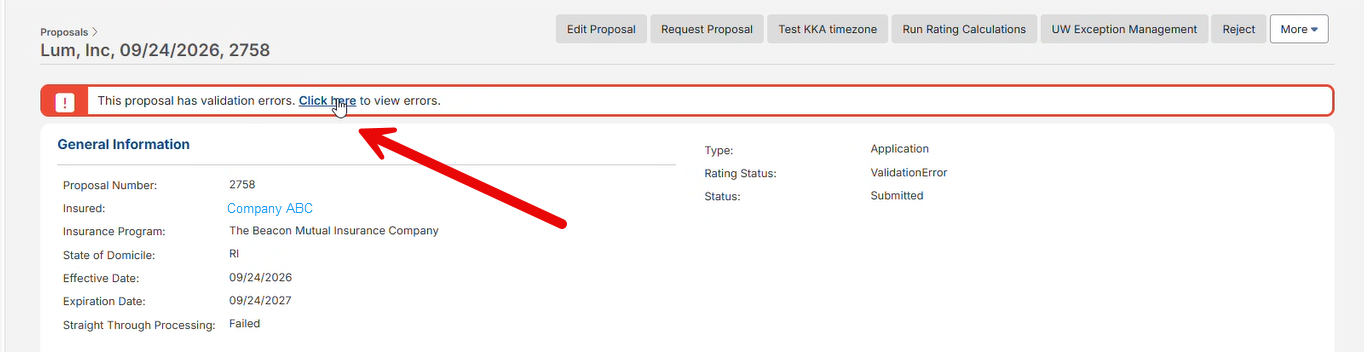
Step 1: Open the Error List
-
Navigate to the proposal.
-
Locate the red validation error banner at the top of the page.
-
Select Click here to view errors.
This will open a list of all validation errors that must be resolved before the proposal can proceed.
Step 2: Review Each Error
The system displays the errors one at a time and identifies the information that requires correction. Examples may include:
-
Missing required fields
-
Incomplete applicant information
-
Invalid data entries
-
Required coverage details not completed
Step 3: Resolve the Error
-
Review the information identified by the system.
-
Enter or correct the required data.
-
Select Fix and Move to Next.
The system will immediately take you to the next validation error.
Step 4: Continue Until All Errors Are Resolved
Repeat the process for each validation error. Once all errors have been corrected:
-
The validation error list will be empty.
-
The red alert banner will no longer appear.
-
The proposal can continue through the submission process.
Frequently Asked Questions
Why am I seeing validation errors?
Validation errors occur when required information is missing, incomplete, or does not meet system requirements. The proposal cannot proceed until all validation issues are corrected.
Do I need to fix all validation errors?
Yes. All validation errors must be resolved before the proposal can move forward in the submission process.
Can I skip an error and come back later?
No. It is recommended that each error be corrected as it appears. Using Fix and Move to Next ensures all required corrections are completed efficiently.
What happens after all validation errors are fixed?
Once all validation errors have been resolved, the proposal can proceed normally and continue through the underwriting and submission workflow.
I fixed an error but still can't proceed. What should I do?
Review the error list again to confirm that no additional validation errors remain. If you continue to experience issues, contact your Beacon support representative or the Help Desk for assistance.
Quick Tip 💡
The fastest way to resolve validation errors is to use the "Fix and Move to Next" button.
This guides you through each required correction until all errors have been cleared and the proposal is ready to proceed.